
Submit a 10 – page paper detailing the process of installing python, vs/py-cham and Django on your personal computer ensure the text is self-explanatory and includes images of each step
Question
Submit a 10 – page paper detailing the process of installing python, vs/py-cham and Django on your personal computer ensure the text is self-explanatory and includes images of each step
Solution
Sure, here is a step-by-step guide to installing Python, Visual Studio Code (VS Code) or PyCharm, and Django on your personal computer. This guide includes images to help you through each step.
Step 1: Installing Python
-
Download Python:
- Go to the official Python website: python.org
- Click on the "Downloads" tab.
- Select the appropriate version for your operating system (Windows, macOS, or Linux).
-
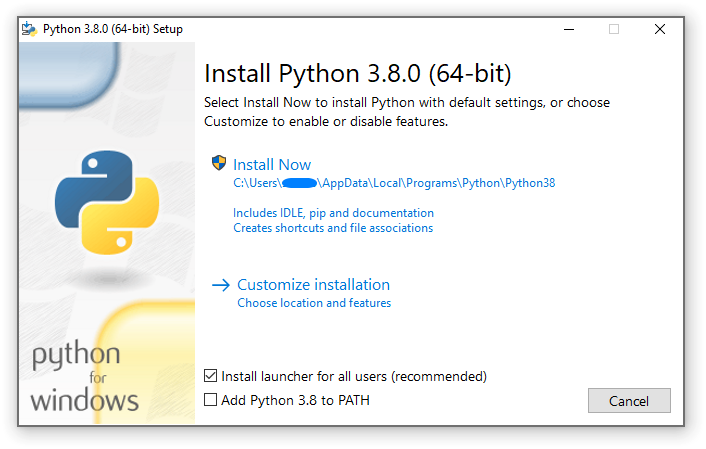
Run the Installer:
- Open the downloaded file to start the installation process.
- Make sure to check the box that says "Add Python to PATH" before clicking "Install Now."
-
Verify Installation:
- Open a command prompt or terminal.
- Type
python --versionand press Enter. You should see the version of Python you installed.

Step 2: Installing Visual Studio Code (VS Code) or PyCharm
Option A: Visual Studio Code (VS Code)
-
Download VS Code:
- Go to the official VS Code website: code.visualstudio.com
- Click on the "Download" button for your operating system.

-
Run the Installer:
- Open the downloaded file to start the installation process.
- Follow the prompts to complete the installation.

-
Install Python Extension:
- Open VS Code.
- Go to the Extensions view by clicking the Extensions icon in the Activity Bar on the side of the window.
- Search for "Python" and install the extension provided by Microsoft.

Option B: PyCharm
-
Download PyCharm:
- Go to the official PyCharm website: jetbrains.com/pycharm
- Click on the "Download" button.
- Choose the Community edition if you want a free version.
-
Run the Installer:
- Open the downloaded file to start the installation process.
- Follow the prompts to complete the installation.

-
Configure Python Interpreter:
- Open PyCharm.
- Go to
File > Settings > Project: <project name> > Python Interpreter. - Click the gear icon and select "Add."
- Choose the Python interpreter you installed earlier.

Step 3: Installing Django
-
Open Command Prompt or Terminal:
- Open a command prompt or terminal window.
-
Install Django:
- Type
pip install djangoand press Enter. This will download and install Django.
- Type
-
Verify Installation:
- Type
django-admin --versionand press Enter. You should see the version of Django you installed.
- Type
Conclusion
You have now successfully installed Python, VS Code or PyCharm, and Django on your personal computer. You are ready to start developing your Django applications. If you encounter any issues, refer to the official documentation for each tool or seek help from online communities.
Similar Questions
Demonstrate the Django framework with the suitable supportingapplication.
This Programming Language Python Tutorial is very well suited for beginners and also for experienced programmers. This specially designed free Python tutorial will help you learn Python programming most efficiently, with all topics from basics to advanced (like Web-scraping, Django, Learning, etc.) with examples.
Django comes with a built-in user interface that allows you to administrate your data. To access this interface you have to create a user name and password. Identify the correct syntax to create such user.
tell me about Python
what's the best way to learn python and master it
Upgrade your grade with Knowee
Get personalized homework help. Review tough concepts in more detail, or go deeper into your topic by exploring other relevant questions.